



About this App
m-Abkari-Delhi APK: Full Review, Features & Overview
m-Abkari-Delhi is an Android utility app developed by the Delhi Excise Department. Its sole purpose is barcode-based verification of liquor bottles and cases within Delhi's regulated supply chain. It is not a shopping app, a product catalog, or a lifestyle platform — it is a government-linked verification tool.
What Is m-Abkari-Delhi?
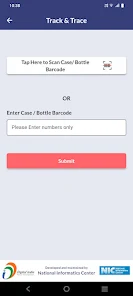
m-Abkari-Delhi lets users scan the barcode on a liquor bottle or case and retrieve information linked to that item in the Excise Department's system. The app exists to support transparency and traceability in Delhi's regulated liquor distribution — not for browsing or purchasing.
If you are looking for a store locator or a product price comparison tool, this is not it. If you need to verify bottle information against an official system, this is exactly what it is built for.
App Details at a Glance
DetailInfoApp Namem-Abkari-DelhiDeveloperDelhi Excise DepartmentCategoryBusiness / UtilityVersion1.0.3APK Size5.71 MBAndroid RequirementAndroid 5.0 and aboveAdsNoneContent RatingMature audiences
Core Features
Barcode Scanning
The primary function. Users open the app, point the camera at a bottle or case barcode, and the app returns linked information from the backend system. There are no manual search fields or product lists — scanning is how the app works.
No Advertisements
The app contains no ads. For a utility tool used in quick verification scenarios, this matters — there are no interruptions between opening the app and completing a scan.
Lightweight Install
At 5.71 MB, the app installs fast and occupies minimal storage. This makes it practical on older or budget Android devices where storage is limited.
Broad Device Compatibility
Android 5.0 support means the app runs on a wide range of devices, including many phones that are several years old.
Permissions
The app requests three categories of permissions, all directly tied to its function:
- Camera — required for barcode scanning
- Network access — required to fetch information from the backend database
- Storage — used for app operations and potentially cached data
No permission in this set is unusual for a scan-and-lookup utility.
Real-World Performance
This is where the app becomes more complicated. A barcode verification tool is only as good as the data it returns. Based on user reports, performance is inconsistent:
Where it works well: The app is small, opens reasonably fast, and the scanning interface is straightforward. For users who get clean scan results, the experience is direct and functional.
Where it falls short: Some users report null errors on scan, incorrect or outdated information, and occasional crashes on launch. For a verification tool — where accuracy is the entire point — these issues directly undermine the app's core value.
The honest summary: when the backend data is accurate and the scan connects properly, the app does its job. When it does not, there is little else in the app to fall back on.
m-Abkari-Delhi vs. Typical Liquor Apps
Featurem-Abkari-DelhiTypical Liquor Store AppMain FocusBarcode verificationShopping and browsingTarget UseItem-level information checkProduct discoveryInterfaceUtility-firstConsumer-facingCore ActionScan barcodeBrowse categoriesAdsNoneFrequently presentFeature DepthNarrow and specificBroader but less precise
Strengths
- Purpose-built — does one thing and does not pad it with unnecessary features
- No ads keep the experience clean
- Small APK size works across older and low-storage devices
- Official government-department backing gives it credibility
- Simple interface reduces friction for quick lookups
Limitations
- Data accuracy issues reported by users reduce trust in results
- Narrow feature set means the app has no fallback value when scans fail
- No updates or active community support visible
- Only useful to a specific subset of users in Delhi
Who Should Install It
Install it if:
- You need to verify bottle or case information against Delhi's Excise system
- You want a lightweight, no-ads utility that does one specific job
- You are a retailer, inspector, or consumer looking for supply chain confirmation
Skip it if:
- You want a liquor shopping or discovery app
- You expect real-time stock or pricing data
- You need a polished, feature-rich experience
Final Verdict
m-Abkari-Delhi is a narrow, government-utility app that does exactly what it claims — scan a barcode, retrieve item information. Its small size, clean interface, and lack of ads are genuine strengths. Its weakness is reliability: when the backend data or scan connection fails, there is nothing else the app offers.
For users who specifically need barcode-based liquor verification in Delhi, it is worth installing. For everyone else, it serves no meaningful purpose.
Frequently Asked Questions
What does m-Abkari-Delhi do?
It scans the barcode on a liquor bottle or case and retrieves information from Delhi's Excise Department system.
Is it a government app?
Yes. It is developed by the Delhi Excise Department and is linked to the official regulated supply chain system.
Does it have ads?
No. The app is entirely ad-free.
What Android version does it require?
Android 5.0 or higher.
How large is the APK? 5.71 MB — small enough to install on any Android device without storage concerns.
Is it useful for regular consumers?
Only if you need to verify bottle information. It is not a store finder, price checker, or shopping app.
Why does the app sometimes show errors?
Scan errors and null results are linked to backend data gaps or connectivity issues. The app depends entirely on its database returning accurate results.















Comments
0 comment(s)